
Connector Setup & Configuration
IT admin guide for the REFRACT Platform Power Platform connector. Covers App Registration setup, connection parameter reference, and environment management.
Architecture
The REFRACT Platform Connector uses a single-tenant, service-to-service architecture. Each organization's Power Platform environment connects directly to its own Dispatcher - there is no shared Refract Logic infrastructure in the data path.
Power Automate Flow
      │
      ▼
REFRACT Platform Connector (Power Platform)
      │  reads 5 connection parameters (Dispatcher URL, Tenant ID,
      │  Client ID, Client Secret, Scope)
      │  connector script acquires a token via
      │  grant_type=client_credentials, then forwards the request
      ▼
Customer-hosted REFRACT Dispatcher (Azure Function App)
      │  validates JWT claims (iss, aud, tid)
      ▼
REFRACT Platform Services
  ├── PDF Generation
  ├── e-Signature Processing
  ├── Approval Workflows
  ├── Audit & Compliance
  └── Document Storage (Blob / SharePoint)
Data sovereignty: OAuth tokens are issued by the customer's own Microsoft Entra ID tenant, using an App Registration the customer's IT admin controls. Documents are generated and stored within the customer's Azure subscription; when a flow triggers REFRACT eSign or REFRACT Workflow, every document download redirects the browser to the customer's own Dispatcher, which streams the bytes directly - the REFRACT-hosted portal never receives them.
No on-premises data gateway involved
This connector does not use, and does not require, Microsoft's On-Premises Data Gateway product. "Gateway" here refers only to the Dispatcher's own /gateway/v1/* route layer - a set of Azure Function routes that accept an OAuth bearer token. There is no gateway to install, and no separate registration of the connector or the App Registration with the Dispatcher; the Dispatcher accepts any bearer token whose iss, aud, and tid claims match its configuration, from wherever the request originates.
Prerequisites
Before creating a connection:
- REFRACT Platform Dispatcher deployed and running in the customer's Azure subscription
- Microsoft Entra ID App Registration for the connector to authenticate with, using client credentials (see below)
- Power Platform environment with System Administrator or Environment Maker permissions
Step 1: Create the App Registration
The connector authenticates to the Dispatcher using OAuth 2.0 client credentials (an app-to-app token, not a per-user sign-in). Each connection stores its own tenant ID, client ID, client secret, and scope, and the connector's own code (a custom connector script) exchanges these for a Bearer token on every call - there is no function key involved.
One connector app for Power Platform
Create an app registration for the Power Platform connector alone. Do not reuse another system's connector app, REFRACT SharePoint Access, or "REFRACT Dispatcher API" itself: a separate connector lets you revoke Power Platform's secret without affecting other systems, and its sign-ins are logged under its own name. The Dispatcher keeps no list of apps. It checks that the token was issued by your tenant for "REFRACT Dispatcher API" (see JWT Validation below), and that the calling app holds the Render.Access application permission. See Connect a source system.
Open Azure Portal
Go to portal.azure.com → Microsoft Entra ID → App registrations → New registration.
Register the Application
| Field | Value |
|---|---|
| Name | REFRACT Platform Power Platform Connector |
| Supported account types | Accounts in this organizational directory only |
| Redirect URI | Leave blank - a client-credentials app registration does not need one |
Click Register.
Note the IDs
From the Overview page, copy:
- Application (client) ID → entered as the connection's Client ID field
- Directory (tenant) ID → entered as the connection's Azure AD Tenant ID field
Create a Client Secret
Go to Certificates & secrets → Client secrets → New client secret.
Set an expiry (recommended: 12 - 24 months). Copy the Value immediately - it is only shown once. This value is entered as the connection's Client Secret field.
Grant Render.Access and Lifecycle.Reader
Under API permissions, remove the Microsoft Graph User.Read permission a new registration lists. Then select Add a permission -> APIs my organization uses -> REFRACT Dispatcher API -> Application permissions, select Render.Access (required for every action) and Lifecycle.Reader (Get Document URL, Check Workflow Status, and Download Sealed PDF), and select Grant admin consent. Admin consent approves every permission on the list, so check it first. An Application Administrator or Cloud Application Administrator can grant it. Without Render.Access, every action fails with 403 and code ROLE_MISSING.
The connection's OAuth Scope is api://<dispatcher-app-client-id>/.default, where <dispatcher-app-client-id> is the client ID of "REFRACT Dispatcher API" (App registrations -> REFRACT Dispatcher API -> Overview), not this connector's client ID.
Step 2: Create a Connection
Once the connector is deployed, it appears in the Power Automate custom connectors list and flow makers can create connections.
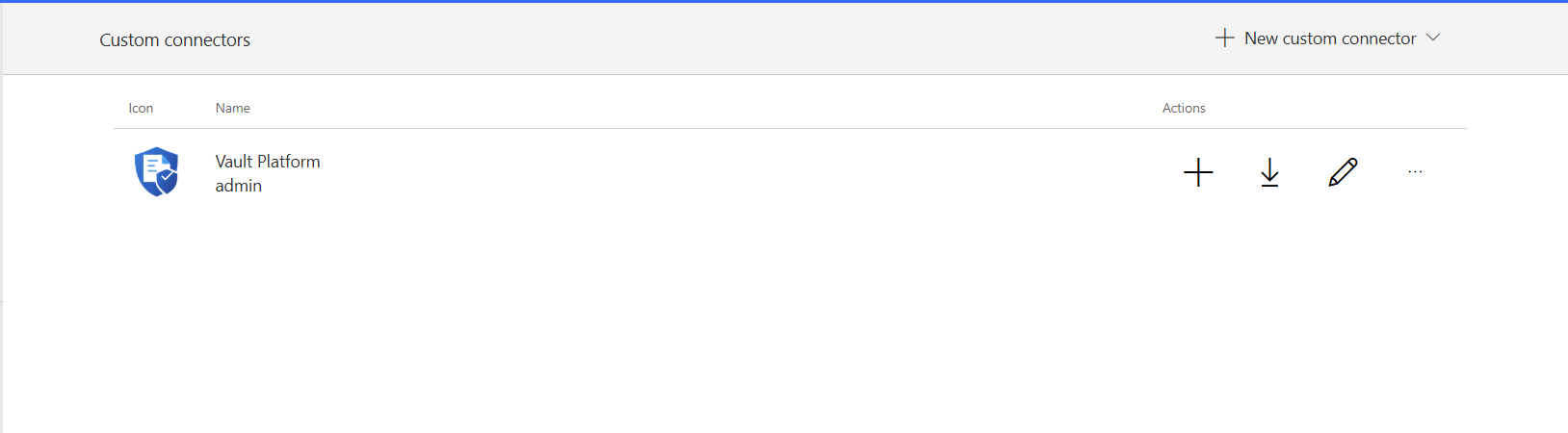
Flow makers (or the IT admin, on their behalf) create connections by entering five values. There is no sign-in step.
Open Power Automate
Go to make.powerautomate.com → Data → Connections → + New connection.
Find and Select REFRACT Platform
Search for REFRACT Platform. Select the connector.
Enter the Connection Fields
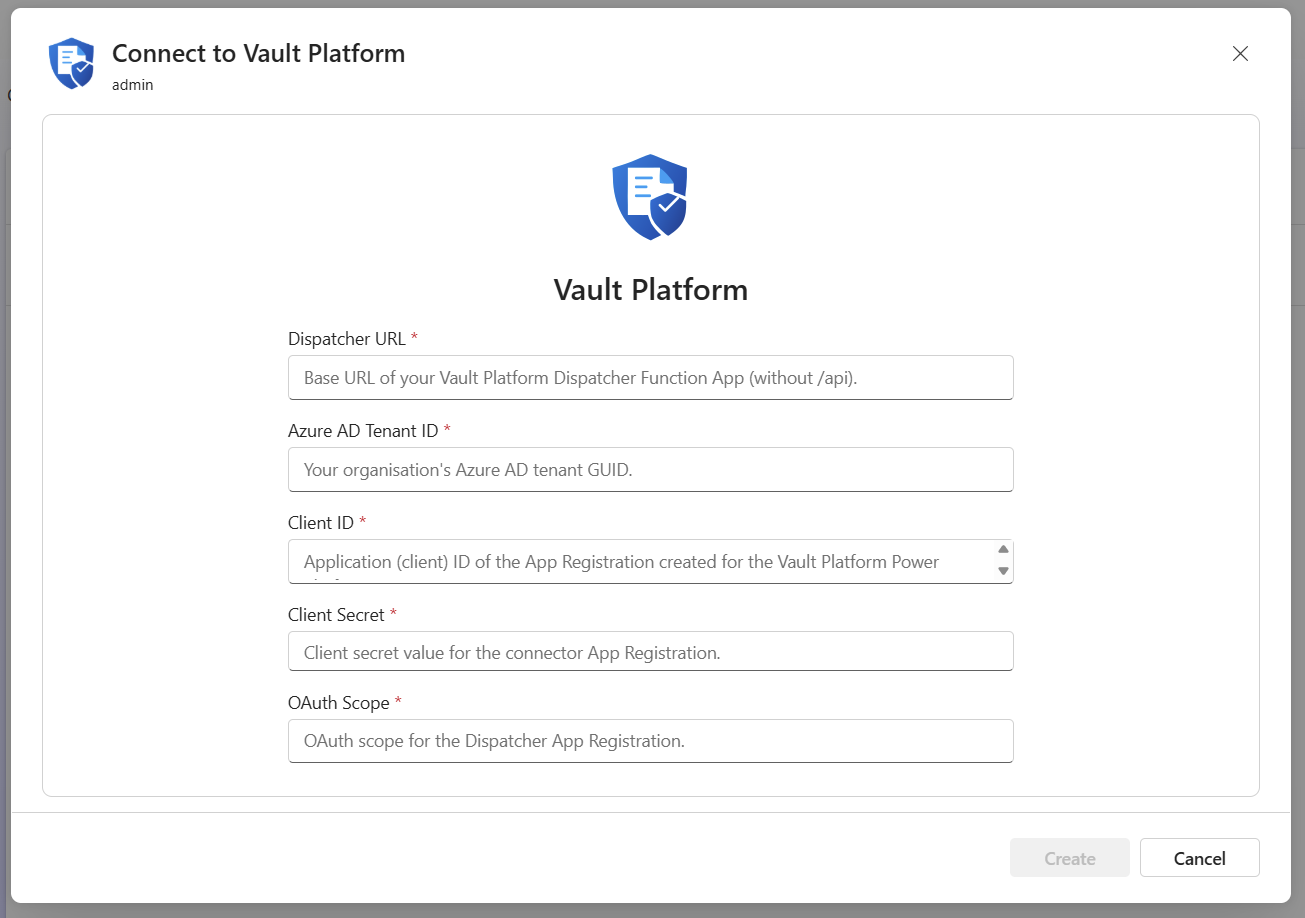
| Parameter | Description | Example |
|---|---|---|
| Dispatcher URL | Dispatcher Function App base URL - no /api suffix | https://func-dispatcher-contoso-prod.azurewebsites.net |
| Azure AD Tenant ID | Organization's Microsoft Entra ID tenant GUID | c49962a1-53d3-4af8-8d5d-35f34cd0be9c |
| Client ID | Application (client) ID of the App Registration from Step 1 | (from Azure Portal) |
| Client Secret | That App Registration's client secret value | (shown once at creation) |
| OAuth Scope | Scope for the Dispatcher's App Registration | api://<dispatcher-app-client-id>/.default |
Dispatcher URL must not include /api
Enter https://func-dispatcher-contoso-prod.azurewebsites.net - the connector appends /api/ to all request paths automatically. If you include /api in the URL the requests will fail with 404.
Create the Connection
Click Create. There is no sign-in window - this connector uses client credentials, so the connection is saved immediately with the five values above. The connector does not define a connection test, so a wrong value only surfaces as an authentication error on the first flow run that uses this connection.
Connection Parameter Reference
| Parameter | Type | Required | Notes |
|---|---|---|---|
hostUrl | string | Yes | Dispatcher Function App base URL. No trailing slash. No /api suffix. |
tenantId | string | Yes | Microsoft Entra ID tenant GUID. Format: xxxxxxxx-xxxx-xxxx-xxxx-xxxxxxxxxxxx |
clientId | string | Yes | Application (client) ID of the App Registration created for this connector. |
clientSecret | securestring | Yes | That App Registration's client secret value. Stored encrypted; never displayed again after saving. |
scope | string | Yes | OAuth scope requested for the client-credentials token, format api://<dispatcher-app-client-id>/.default. |
These five values are stored per connection - there is no connector-level OAuth configuration shared across connections. Each connection can use a different App Registration if needed.
No function key
The Dispatcher's gateway routes do not use a function key. Authentication is entirely the client-credentials token the connector's own script acquires from the five connection values above.
Authentication Model
The REFRACT Platform Connector uses OAuth 2.0 client credentials - an app-to-app token, not an interactive user sign-in.
On every action call, the connector's own script (script.csx) reads the connection's tenant ID, client ID, client secret, and scope (injected as request headers by the connection's policy templates, then stripped before forwarding), posts a grant_type=client_credentials request to https://login.microsoftonline.com/{tenantId}/oauth2/v2.0/token, and attaches the resulting access token as a Bearer header on the forwarded request to the Dispatcher.
The client secret is stored encrypted as part of the connection. It is used only to acquire tokens from Azure AD - it is never forwarded to the Dispatcher and never visible again after the connection is saved.
JWT Validation
Before processing any request, the Dispatcher validates:
- Issuer (iss) - Token must be issued by the authorised Microsoft Entra ID tenant.
- Audience (aud) - Token must be intended for the Dispatcher's application registration. Both a bare client-ID audience and an
api://-prefixed audience are accepted and compared as equal. - Tenant ID (tid) - Token must belong to the tenant configured in the Dispatcher's
AZURE_TENANT_IDsetting.
All three validations must succeed. Tokens issued for another tenant or another application are rejected before request processing begins. There is no IP allowlist and no gateway-registration check - a token that passes these three checks must also hold the Render.Access application permission, or it is refused with 403 and code ROLE_MISSING. Nothing checks where the request originates.
Tenant Isolation
A token that passes issuer and audience validation but contains a different tenant ID is rejected.
This prevents cross-tenant access and ensures only identities from the authorised Microsoft Entra tenant can invoke the customer-hosted Dispatcher.
Execution Model
Every action call runs through the connector's script.csx: it reads the credential headers, requests a token from Azure AD, attaches it as a Bearer header, and forwards the request to the Dispatcher.
Power Platform's custom-code connectors (the script.csx mechanism) carry a platform-level 5-second CPU budget, but time spent waiting on network calls - the Azure AD token request and the Dispatcher's own processing - does not count against it.
In practice, the effective limit is the Power Automate action timeout (typically 120 seconds). Document generation time varies with template complexity and payload size.
Customer-Hosted Processing
The connector never processes document content.
Document rendering, storage, and audit processing occur within the customer-hosted Dispatcher environment. When a request triggers REFRACT eSign, REFRACT Delivery, or REFRACT Workflow, every document download redirects the browser to the customer-hosted Dispatcher or SharePoint site, which serves the bytes directly; the REFRACT-hosted portal never receives them. The connector acts solely as an authenticated gateway between Power Platform and the Dispatcher API.
Dispatcher Environment Variables
The Dispatcher Function App must have these environment variables configured:
| Variable | Description | Example |
|---|---|---|
JWT_REQUIRED | Enforces JWT on all gateway routes. Fail-closed by default: enforcement is enabled unless this is set to the literal string "false". Leave unset (or "true") in production. | (leave unset, or true) |
JWT_ISSUER | Microsoft Entra ID token issuer URL | https://login.microsoftonline.com/{tenantId}/v2.0 |
JWT_AUDIENCE | Expected aud claim: the client ID of "REFRACT Dispatcher API", which infra/deploy.ps1 sets. Never a connector app's client ID. Tokens with or without the api:// prefix are accepted. | <dispatcher-app-client-id> |
AZURE_TENANT_ID | Authorised tenant GUID - checked against token tid claim | c49962a1-... |
JWT_JWKS_URI | Optional - auto-derived from JWT_ISSUER if not set | (leave blank) |
Do not set JWT_REQUIRED to false in production
JWT enforcement fails closed by default - it is already enabled unless JWT_REQUIRED is explicitly set to the literal string "false". That opt-out exists only for local development (func start). Never set it in a production Dispatcher.
Multiple Environments
Create a separate connection for each environment (dev, test, prod). Each environment's Dispatcher has its own "REFRACT Dispatcher API" app registration, so the connection's Dispatcher URL and OAuth Scope both differ per environment. One connector app can hold permissions on several of them, but a connector app per environment keeps production credentials out of test flows.
| Environment | Dispatcher URL | Connection Name |
|---|---|---|
| Development | https://func-dispatcher-contoso-dev.azurewebsites.net | REFRACT Platform - Dev |
| Test | https://func-dispatcher-contoso-test.azurewebsites.net | REFRACT Platform - Test |
| Production | https://func-dispatcher-contoso-prod.azurewebsites.net | REFRACT Platform - Prod |
Deployment Checklist
Before going to production:
- App Registration created and client secret noted
- The connection's OAuth Scope is
api://<dispatcher-app-client-id>/.default, using the client ID of "REFRACT Dispatcher API" (the Dispatcher'sJWT_AUDIENCEalready holds that ID; it needs no change for a new connector) - Dispatcher env vars set:
JWT_ISSUER,JWT_AUDIENCE,AZURE_TENANT_ID(JWT_REQUIREDleft unset or"true") - Connection created with all five values (Dispatcher URL, Tenant ID, Client ID, Client Secret, Scope) - there is no connection test, so verify by running a flow
- The connector's App Registration holds the
Render.Accessapplication permission, admin-consented (required for every action) - If flows use Get Document URL, Check Workflow Status, or Download Sealed PDF: the connector's App Registration has the
Lifecycle.Readerapplication permission, admin-consented (see Integrations that use app tokens) - Generate Document action tested end-to-end with a real template and payload
- Error handling implemented in flows (Configure run after → failed)
- Client secret expiry date calendared for renewal
Troubleshooting
These errors come from the connector's own script.csx, before the request ever reaches the Dispatcher:
| Error | Cause | Fix |
|---|---|---|
Connection parameter 'tenantId' is missing. Edit the connection and provide a value. (or clientId/clientSecret/scope) | That field was left blank when the connection was created | Edit the connection and fill in the missing value |
Invalid Client ID or Client Secret. Check your connection settings. | Azure AD returned invalid_client | Verify the Client ID and Client Secret against the App Registration's Overview and Certificates & secrets |
App not authorised for client_credentials. Check App Registration API permissions. | Azure AD returned unauthorized_client | Grant and admin-consent the required API permission on the App Registration |
Invalid OAuth Scope. Expected format: api://<app-id>/.default. | Azure AD returned invalid_scope | Correct the Scope field to api://<dispatcher-app-client-id>/.default |
Azure AD rejected the token request (invalid_request): ... | Azure AD returned invalid_request - usually a malformed Tenant ID, Client ID, Secret, or Scope | Re-enter the four values carefully, with no extra whitespace |
Azure AD tenant not found. Check the Tenant ID value. | Azure AD returned tenant_not_found | Verify the tenant ID in Azure Portal → Microsoft Entra ID → Overview |
Authentication timed out. Check that the Tenant ID is correct and Azure AD is reachable. | The token request to login.microsoftonline.com did not complete | Confirm outbound connectivity from Power Platform to Microsoft Entra ID |
These errors come from the Dispatcher itself, once a valid token reaches it:
| Error | Cause | Fix |
|---|---|---|
503 with code TENANT_SCOPE_NOT_CONFIGURED | AZURE_TENANT_ID not set on the Dispatcher | Set AZURE_TENANT_ID in the Dispatcher Function App's environment variables |
503 with code LICENSE_UNAVAILABLE on Generate Document | The Dispatcher could not reach the licensing service, and has no grace period | The flow may send the request again after Retry-After. If it keeps happening, check that the Dispatcher can reach the licensing service |
404 (empty body, x-ms-function-status: OK) | Dispatcher URL includes /api | Remove /api from the Dispatcher URL in the connection |
401 from Dispatcher | Token signature, issuer, audience, or expiry check failed | Confirm the OAuth Scope names "REFRACT Dispatcher API" (api://<dispatcher-app-client-id>/.default, not the connector's own client ID), and that the tenant ID is the Dispatcher's tenant |
403 from Dispatcher | Token's tid claim is missing or does not match | Confirm AZURE_TENANT_ID on the Dispatcher matches the tenant configured on the connection |
403 with code ROLE_MISSING and "role": "Render.Access" on any action | The connector's app does not hold Render.Access | Grant Render.Access to the connector's App Registration as an application permission and grant admin consent. See Integrations that use app tokens |
403 with code ROLE_MISSING and "role": "Lifecycle.Reader" on Get Document URL, Check Workflow Status, or Download Sealed PDF | The connector's app does not hold the Lifecycle.Reader role | Grant Lifecycle.Reader to the connector's App Registration as an application permission and grant admin consent. See Integrations that use app tokens |
Every other code the Dispatcher can return, and when a flow may send a request again, is on Error responses and codes.
Next Steps
- Overview & Quick Start - Build your first flow
- API Reference - Complete parameter definitions and response schemas
- Error responses and codes - Every error code the Dispatcher returns, and when to retry
- Trust Center - Security controls and compliance documentation
- Privacy Policy - Data processing and protection
- Terms of Service - Legal terms of use
REFRACT Platform Connector for Power Platform
Connect Power Automate and Power Apps to your organization's REFRACT Platform Dispatcher. Generate PDFs, send documents for e-signature and approval workflows, and retrieve sealed documents - without writing code.
API Reference
Complete parameter definitions, response schemas, feature flags, and error codes for all four REFRACT Platform Power Platform connector actions.