
System Architecture
A deep dive into REFRACT PDF's No-Egress security model and tenant-native integration.
The No-Egress Philosophy
REFRACT PDF is engineered on the principle of Data Residency. Your sensitive JSON data never leaves your environment.
Tenant-Native Rendering
The document rendering engine runs inside the customer's own tenant. Our central API only handles licensing handshakes, never document content.
For a detailed breakdown of authentication mechanisms, access controls, and document integrity enforcement, see Security & Verification.
Technical Stack
Serverless Rendering
REFRACT PDF processes document rendering serverlessly, allowing automatic scaling and low operational overhead for both SMB and enterprise workloads.
Async Queue Processing
REFRACT PDF supports optional asynchronous processing using a queue-based dispatch layer, enabling high-volume document generation and enterprise batch workflows.
Flexible Storage Providers
Templates and document payloads can be retrieved from Microsoft SharePoint, with planned support for additional providers such as Azure Blob Storage to support cloud-native deployments.
Secure License Validation
REFRACT PDF verifies license validity using a signed token from the Refract Logic licensing service, without transmitting sensitive document data outside the customer environment.
Multi-Stage Rendering Pipeline
Documents are processed through a multi-stage rendering pipeline that normalizes structure, resolves styles, and validates layout safety.
Dynamics 365 and Power Automate Integration
REFRACT PDF is designed to integrate with systems like Microsoft Dynamics 365 and Microsoft Power Automate, enabling automated document generation directly within business workflows.
Data Flow: How It Works
REFRACT PDF renders documents entirely within the customer's cloud environment using native services from Microsoft Azure. The following steps describe how a document request moves through the REFRACT PDF rendering system.
Trigger & JSON Payload
Your system (Dynamics 365, Power Apps, or any HTTP client) calls the REFRACT PDF rendering endpoint with the document data as a JSON payload.
License Validation
The engine performs a license check against the Refract Logic licensing service using metadata only, verified with a signed token. No document content is transmitted.
Template Retrieval
The rendering engine retrieves the .rpkg template file from your SharePoint Templates library (then the System Templates library, if it is not found there) using Managed Identity - no stored credentials required.
Optional Batch Dispatch
For large workloads, jobs are queued for asynchronous processing via the built-in workflow queue.
Local Rendering
The PDF is generated entirely in memory inside the customer's Azure environment.
Document Delivery
The completed PDF is returned to the calling system or saved back to SharePoint.
Architecture Diagram
Canonical architecture diagram and Mermaid source (interactive):
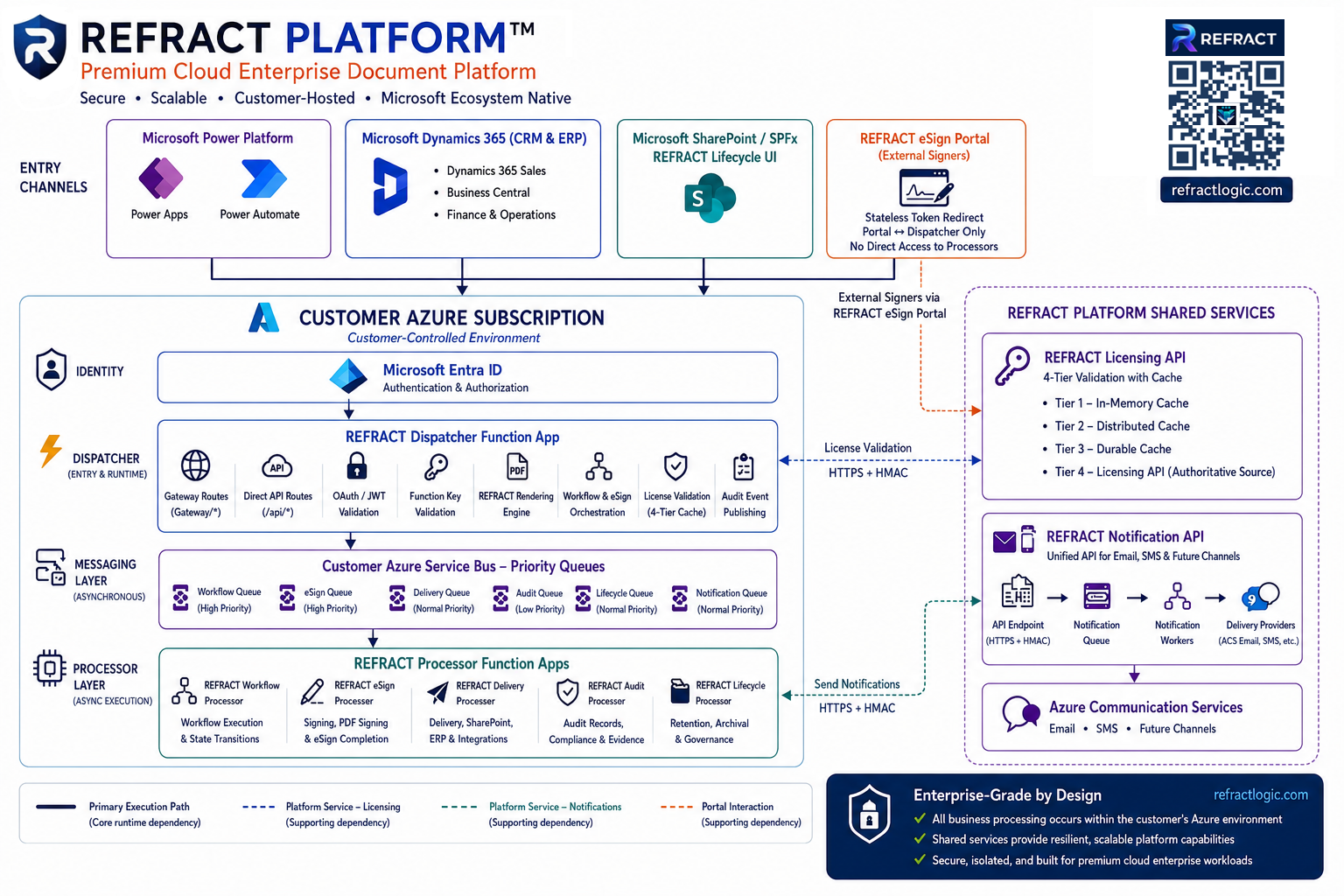
Every document download redirects the browser to the customer's own Dispatcher or SharePoint site, which serves the bytes directly; the portal never receives them. It keeps signer contact details, one-time-code hashes, and session state in its own database, and the signature image, field values, and REFRACT Workflow attachment uploads pass through it in memory only, on their way to the Dispatcher. Notifications carry metadata only.
flowchart TB

subgraph EC["Entry Channels"]
PP["Power Platform<br/>Power Apps<br/>Power Automate"]
D365["Dynamics 365 (CRM & ERP)<br/>• Dynamics 365 Sales<br/>• Business Central<br/>• Finance & Operations"]
SP["SharePoint / SPFx<br/>REFRACT Lifecycle UI"]
PORTAL["REFRACT eSign Portal<br/>(External Signers)"]
end

subgraph CUSTOMER["Customer Azure Environment"]
ENTRA["Microsoft Entra ID<br/>Authentication & Authorization"]
DISP["REFRACT Dispatcher Function App<br/>• Gateway Routes (/gateway/*)<br/>• Direct API Routes (/api/*)<br/>• OAuth / JWT Validation<br/>• REFRACT PDF Rendering Engine<br/>• Workflow & eSign Orchestration"]
BUS["Customer Azure Service Bus<br/>Priority Queues<br/>Workflow • eSign • Delivery • Notification • Audit"]
PROC["Processor Function Apps<br/>REFRACT Workflow<br/>REFRACT eSign<br/>REFRACT Delivery<br/>REFRACT Audit<br/>REFRACT Lifecycle"]
ENTRA --> DISP
DISP --> BUS
BUS --> PROC
end

subgraph SHARED["REFRACT Platform Shared Services (Refract Logic)"]
LIC["Licensing API - licenseKey + tenantId only"]
NOTIFY["REFRACT Notification API - metadata only"]
ACS["Azure Communication Services - Email/SMS"]
NOTIFY --> ACS
end

PP --> ENTRA
D365 --> ENTRA
SP --> ENTRA
PORTAL -. "Portal ↔ Dispatcher" .-> DISP
DISP -. "License Validation" .-> LIC
PROC -. "Workflow / Delivery / eSign Notifications" .-> NOTIFY
PORTAL -. "Invitation Emails / Signer Notifications" .-> NOTIFY
Licensing & Governance
Your Dispatcher validates its licence with the REFRACT licensing service (POST /api/v1/validate). The request carries only these fields; signature is sent when an identity token has been issued to your deployment, and dispatcherUrl is your Function App's own address:
{
  "tenantId": "00000000-0000-0000-0000-000000000000",
  "licenseKey": "LIC-xxxxxxxx",
  "signature": "<identity token>",
  "dispatcherUrl": "https://<your-dispatcher>.azurewebsites.net"
}
Licence Key Security
Never expose your licence key in client-side code or commit it to version control. Keep it in Azure Key Vault and reference it from the Function App's settings.
See the Architecture in Action
Explore the interactive playground to trace a live document request through the full No-Egress pipeline.
Capabilities & Features
A comprehensive overview of REFRACT PDF's document rendering capabilities, enterprise features, async workflows, and monitoring tools - all in a single self-hosted engine.
REFRACT PDF Rendering Pipeline
REFRACT PDF processes every template through a multi-stage rendering pipeline, structured across 12 sequential stages from structure normalization to final PDF output.